Goodbye .envrc, Hello Infisical: One Secret Manager for My Entire Setup
How I migrated environment variable management from direnv/.envrc to Infisical to centralize all secrets for Terraform, Ansible and Kubernetes across my workstations and CI/CD pipelines.
Context
Between SaaS subscriptions and self-hosted services, secrets pile up fast: credentials, passwords, tokens (Azure, AWS, Proxmox, Cloudflare)… Every IaC tool needs them to authenticate and talk to APIs.
The classic answer: gitignored .envrc/.env files, loaded automatically by direnv. Works fine on one machine. Once you have two laptops, a dozen Proxmox VMs, and a set of CI/CD pipelines, things fall apart. Each machine where the .envrc silently drifts out of sync.
I run pre-commit hooks that scan every changed file for accidental leaks. Useful, but it does not fix the underlying problem.
1
2
3
4
5
6
7
8
# A .envrc that ends up looking like this
export ARM_TENANT_ID="..."
export VAULT_TOKEN="..."
export PROXMOX_VE_PASSWORD="..."
export CLOUDFLARE_API_TOKEN="..."
export AWS_ACCESS_KEY_ID="..."
export AWS_SECRET_ACCESS_KEY="..."
# ... 30 more variables
I migrated to Infisical, a self-hosted open-source secret manager, to have one source of truth — across all my machines and in CI/CD.
Goal
After reading this, you will know:
- Why
direnvbreaks down the moment you go beyond a single machine - Why I picked
InfisicaloverOpenBaodirectly (which I already use for other things) - How the integration works with
Terraformand Gitea Actions / GitHub Actions pipelines - What it actually looks like day to day
This is not a step-by-step Infisical installation guide. It is a migration experience report.
The Problem with direnv
Where direnv shines
direnv is a well-designed tool. It hooks into your shell’s directory change, loads the .envrc file if one is present, and unloads it when you leave. No server, no service — just your shell.
1
2
3
4
5
6
7
# After a simple `direnv allow .`
cd your-terraform-project # example
# ✅ All vars are automatically loaded
terraform plan

cd ../..
# ✅ All vars are automatically unloaded
Clean, lightweight, zero friction for a single developer on a single machine.
Where it breaks down
My my-awesome-monorepo before the migration:
1
2
3
4
5
root/
├── ~/.envrc                          # Global vars (ARM_*, VAULT_*, ...)
├── iac/
│   ├── terraform/.envrc              # Terraform vars (ARM_*, PROXMOX_*, ...)
│   └── ansible/.envrc                # Template (the real one is not versioned)
Concrete problems:
- Duplication: the same
ARM_*variables live in~/.envrcand iniac/terraform/.envrc. Change one value = update it in multiple places. - Not portable: my main
.envrclives on my primary laptop. On the other machines I have different files, often outdated. - CI/CD blind spot: Gitea Actions and GitHub Actions have no concept of
.envrc. You need a completely separate mechanism for secrets in CI. - Secrets on disk: even gitignored, secrets sit in plaintext local files. AI agents often have access to these. A bad
.gitignoreentry and it is game over. - No environment separation: one
.envrcforlab,dev, andprod— you end up commenting, uncommenting, or maintaining multiple files.
A gitignored
.envrcis still plaintext on disk. If your machine is compromised, so are your secrets.
The workaround I tried first
Before Infisical, I added increasingly complex recipes to my task runner just — loading the .envrc as a .env file, or sourcing it manually inside each shell command. That works locally, but solves nothing: no multi-machine sync (yes, tools like syncthing exist but secrets are still plaintext on disk), no CI/CD integration, no per-environment management, no audit trail. A task runner automates tasks; it does not manage secrets.
When your recipes get complicated just to load secrets, that is a sign you need a dedicated tool.
Why Infisical?
Quick overview
Infisical is an open-source secret management platform. SaaS or self-hosted — in my case, via an Ansible role and Docker Compose, or Kubernetes.
What pushed me toward it:
| Criteria | direnv | HashiCorp Vault/Openbao | Infisical |
|---|---|---|---|
| Self-hostable | ✅ | ✅ | ✅ |
| Simple CLI | ✅ | ⚠️ complex | ✅ |
| Subprocess env injection | ❌ | ❌ agent somewhat complex | ✅ infisical run -- your command |
| Environments (lab/dev/prod) | ❌ manual | ✅ Namespaces for Bao, Vault enterprise | ✅ native |
| Machine Auth (CI) | ❌ | ✅ | ✅ Universal Auth |
| Web UI + audit log | ❌ | ✅ | ✅ |
| Setup ease | ✅✅ | ⚠️ | ✅ |
| Open source | ✅ | ⚠️ BSL for Vault, but Bao is open source | ✅ Apache 2 |
I already use Vault/OpenBao for other purposes (PKI, dynamic secrets, external secrets k8s). Infisical sits alongside it without conflict. In another article I will cover the Kubernetes integration via the Infisical/External Secrets operator.
Infisical’s machine identity (Universal Auth) is built for CI/CD: a client ID + secret you can revoke individually, with per-pipeline granular permissions.
How secrets are organized in Infisical
I grouped secrets into functional folders, inside each environment (lab, dev, prod):
mindmap
  root((Infisical Project))
    lab
      /aws
        AWS_ACCESS_KEY_ID
        AWS_SECRET_ACCESS_KEY
      /azure
        ARM_TENANT_ID
        ARM_CLIENT_ID
        ARM_CLIENT_SECRET
      /vault
        VAULT_ADDR
        VAULT_NAMESPACE
      /proxmox
        PROXMOX_VE_USERNAME
        PROXMOX_VE_PASSWORD
      /cloudflare
        CLOUDFLARE_API_TOKEN
        CLOUDFLARE_ZONE_ID
    dev
      same structure
    prod
      same structure
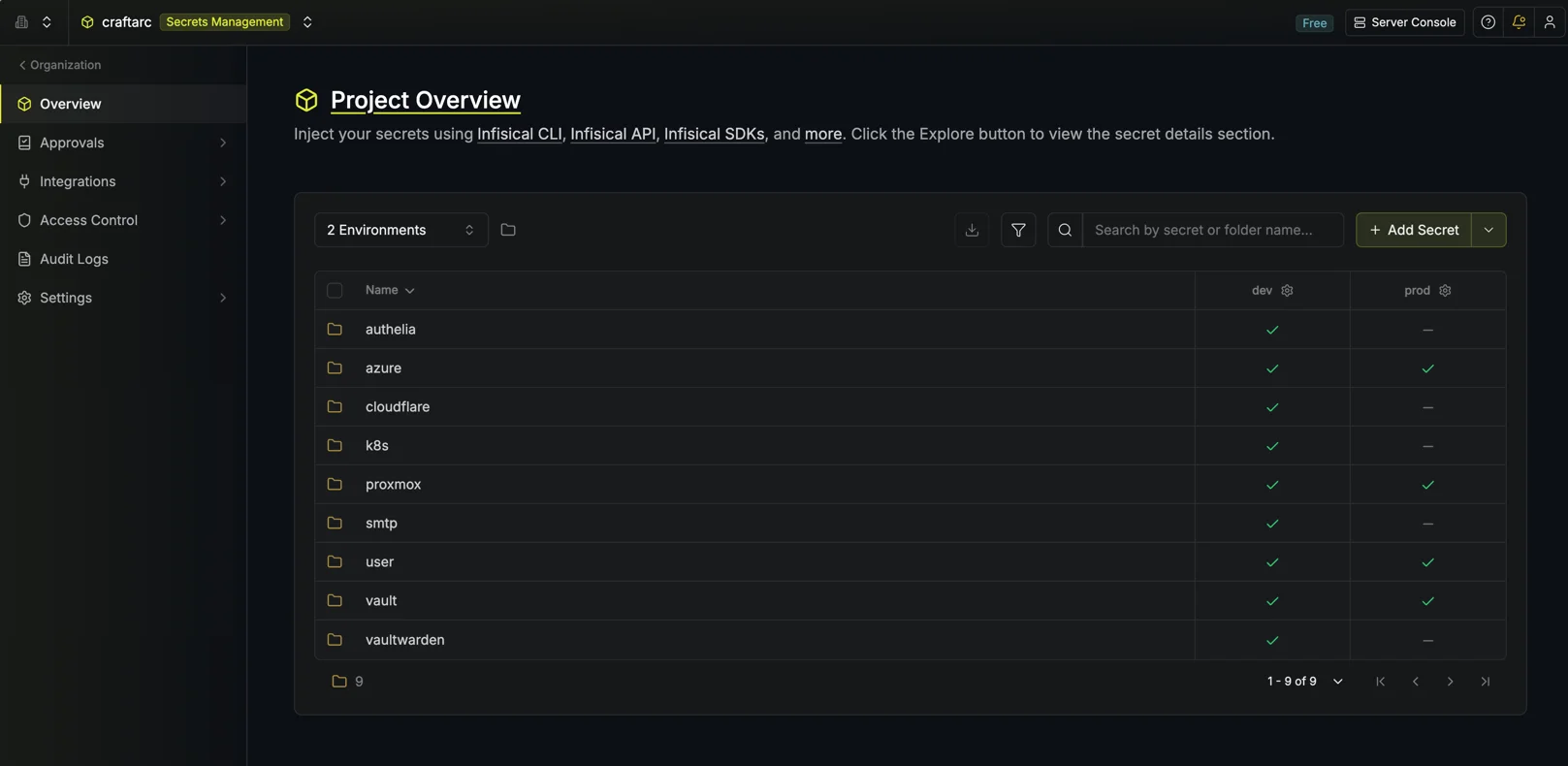 Configuration Sample
One Infisical project, three distinct contexts. infisical run --env lab injects the lab secrets — that is it.
Architecture after migration
Workstation to CI/CD pipeline:
sequenceDiagram
    autonumber
    box rgb(30,40,60) Workstation
        participant Dev as Developer
        participant Infisical as infisical CLI
    end
    box rgb(20,50,40) Server
        participant Server as Infisical Server
        participant TF as terraform
    end

    Dev->>Infisical: infisical run --env lab --recursive -- terraform plan
    Infisical->>Server: Fetch secrets (lab/*)
    Server-->>Infisical: Secrets (in memory)
    Infisical->>TF: terraform plan<br/>(vars injected in memory)
    Note over Infisical,TF: Secrets never touch the disk
sequenceDiagram
    autonumber
    box rgb(30,30,60) CI/CD Pipeline
        participant CI as CI Runner
        participant Login as infisical login
        participant Infisical as infisical CLI
    end
    box rgb(20,50,40) Server
        participant Server as Infisical Server
        participant TF as terraform
    end

    CI->>Login: universal-auth (CLIENT_ID + SECRET)
    Login->>Server: Authenticate
    Server-->>Login: INFISICAL_TOKEN
    Login->>CI: export INFISICAL_TOKEN
    CI->>Infisical: infisical run --env prod --recursive -- terraform plan
    Infisical->>Server: Fetch secrets (prod/*)
    Server-->>Infisical: Secrets (in memory)
    Infisical->>TF: terraform plan -out plan.tfplan
    Note over CI,TF: Secrets injected in memory only
The infisical run command is identical on my laptop, on the other machines, and inside pipelines. No .envrc to sync, no hardcoded secrets.
Migration in practice
Step 1: Self-host Infisical with Docker Compose
Infisical offers a cloud version if you do not want to manage the infrastructure. For my homelab, I self-host.
Deployment structure
Infisical runs as three containers:
| Container | Image | Role |
|---|---|---|
infisical | infisical/infisical | Main application (port 8080) |
infisical-db | postgres:18-alpine | Database (encrypted secrets) |
infisical-redis | redis:8-alpine | Cache and job queues |
Plan for at least 2 CPU cores, 4 GB RAM, and 20 GB disk.
Quick option: official Docker Compose
1
2
3
4
5
6
7
8
# Download the official compose file
curl -o docker-compose.prod.yml https://raw.githubusercontent.com/Infisical/infisical/main/docker-compose.prod.yml

# Download the example .env file
curl -o .env https://raw.githubusercontent.com/Infisical/infisical/main/.env.example

# Protect the .env file
chmod 600 .env
Edit the .env for the critical variables:
1
2
3
4
5
6
7
8
# Generate an encryption key (16 bytes hex)
ENCRYPTION_KEY=$(openssl rand -hex 16)

# Generate an auth secret (32 bytes base64)
AUTH_SECRET=$(openssl rand -base64 32)

# URL of your instance
SITE_URL=http://localhost:80 # or your homelab domain if you have one
Never commit the
.envfile. It holds the encryption key for all your secrets — lose it and the data is unrecoverable even with a database restore.
1
2
3
4
5
6
7
docker compose -f docker-compose.prod.yml up -d

# Verify all 3 containers are up
docker compose -f docker-compose.prod.yml ps

# Test the API
curl -s http://localhost:80/api/status
The first user to sign up becomes the instance administrator.
Step 2: Bind the project with .configs/.infisical.json
At the root of the repo, a .configs/.infisical.json file ties the repository to the Infisical project. The CLI picks it up automatically.
1
2
3
{
  "workspaceId": "fa2768c4-0000-0000-0000-000000000000"
}
Step 3: Migrate secrets with a script
I wrote a script that reads variables from ~/.envrc and pushes them into Infisical by folder and environment:
1
2
3
4
5
6
7
8
9
10
11
12
13
14
15
16
17
18
19
20
21
# Variable prefix → Infisical folder
folder_for() {
  case "$1" in
    ARM_*|AZURE_*)  echo "/azure"      ;;
    VAULT_*)        echo "/vault"      ;;
    PROXMOX_*)      echo "/proxmox"    ;;
    CLOUDFLARE_*)   echo "/cloudflare" ;;
    CLUSTER_*)      echo "/cluster"    ;;
    *)              echo "/misc"       ;;
  esac
}

# Push common variables to all three environments
for var in ARM_TENANT_ID ARM_SUBSCRIPTION_ID ARM_CLIENT_ID ARM_CLIENT_SECRET; do
  for env in lab dev prod; do
    infisical secrets set "${var}=${!var}" \
      --env "${env}" \
      --path "$(folder_for ${var})" \
      --domain https://infisical.home.example.com
  done
done
The full script supports --dry-run, --env, --force, and handles folder creation automatically.
Step 4: Integrate Infisical into just recipes
Rather than prefixing every command manually with infisical run ..., I use my task runner just — a minimalist task management tool inspired by make, without its pitfalls — to encapsulate the call once. The invocation stays simple after that:
1
2
3
4
just env=lab init  # initialize Terraform with lab secrets
just env=lab plan  # plan with lab secrets
just env=prod plan # plan with prod secrets
just env=dev apply # apply with dev secrets
A _infisical variable built once at the top of the justfile, reused in every recipe:
1
2
3
4
5
6
7
8
9
10
11
12
13
14
15
16
17
18
19
20
21
env := env_var_or_default("ENV", "lab")

# Common prefix for all secret-aware recipes
_infisical := "infisical run" \
    + " --env "       + env \
    + " --projectId fa2768c4-0000-0000-0000-000000000000" \
    + " --domain https://infisical.home.example.com" \
    + " --recursive --silent"

init:
     -- terraform init

plan:
     -- terraform plan \
        -var-file=variables/common.tfvars \
        -var-file=variables/.tfvars

apply:
     -- terraform apply \
        -var-file=variables/common.tfvars \
        -var-file=variables/.tfvars
The env variable is passed as a just argument: no .envrc to source, no manual export. Secrets are injected in-memory only for the duration of the recipe.
The
--recursiveflag is important: it loads secrets from all sub-folders (/azure,/vault,/proxmox, etc.) in a single call. Without it, only the root folder is loaded.
Step 5: CI/CD integration with Universal Auth
For pipelines, Infisical provides machine authentication with no interactive session. I created two reusable composite actions:
Login:
1
2
3
4
5
6
7
8
9
10
# .ci/actions/infisical-login/action.yml
name: Infisical Login
runs:
  using: composite
  steps:
    - name: Authenticate
      shell: bash
      run: |
        token=$(infisical login --method=universal-auth --silent --plain)
        echo "INFISICAL_TOKEN=${token}" >> "$GITHUB_ENV"
Usage in a pipeline:
1
2
3
4
5
6
7
8
9
10
11
12
13
14
15
16
17
18
env:
  INFISICAL_API_URL: $
  INFISICAL_UNIVERSAL_AUTH_CLIENT_ID: $
  INFISICAL_UNIVERSAL_AUTH_CLIENT_SECRET: $

steps:
  - uses: actions/checkout@v4
  - uses: ./.ci/actions/infisical-login
  - name: Plan
    working-directory: iac/terraform
    run: |
      infisical run \
        --env prod \
        --projectId fa2768c4-0000-0000-0000-000000000000 \
        --recursive \
        -- terraform plan -out plan.tfplan
  - uses: ./.ci/actions/infisical-logout
    if: always()
In CI, 3 secrets are enough (API_URL, CLIENT_ID, CLIENT_SECRET). Everything else (ARM, Proxmox, Vault, etc.) goes through Infisical — the pipeline never sees them directly.
Fewer secrets in CI variables means fewer ways for things to go wrong. With Infisical, business secrets never leave the server, except when injected in-memory into the subprocess.
Useful resources
- Infisical — Official documentation
- Infisical CLI — Reference
- direnv — Documentation
- Infisical — Universal Auth (Machine Identity)
- Infisical — Kubernetes Operator
Conclusion
What changed day to day:
- New laptop:
infisical login,just env=lab plan— works immediately, nothing to copy - New CI pipeline: 3 variables instead of 30, the rest comes from Infisical
- Rotating a secret: one change in the UI, propagated everywhere
Secrets exist in memory only, for the duration of the subprocess. Nothing on disk, nothing in logs.
Ansible and Kubernetes are next. The mechanics are the same — just a matter of time.
If you manage multiple IaC tools across multiple machines, the question is not whether to centralize your secrets, but when.
How do you manage your IaC secrets in your homelab? Share your experience in the comments!